What's New — March 2026

9 releases in March 2026.

Free Tier Access & Premium Gating#

Added

  • Free Access to Core GEX Charts: GEX by Strike, Gamma Profile, and OHLC charts are now available to all users — no account required. See real-time gamma data without signing up.
  • Term Structure for Free Users: Term Structure chart is now accessible to free users with Open Interest data visible. GEX metrics and premium markers require Premium.
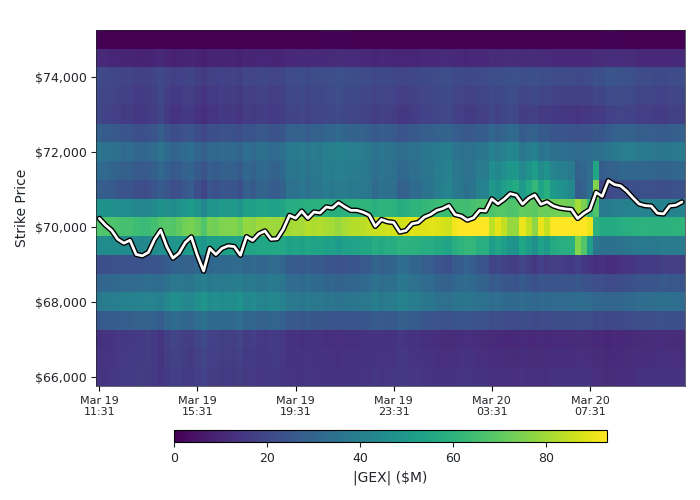
  • Heatmap Preview for Free Users: Free users can view a GEX Heatmap preview with the most recent 30% masked. Full history and hover data available with Premium.

Net GEX (free)
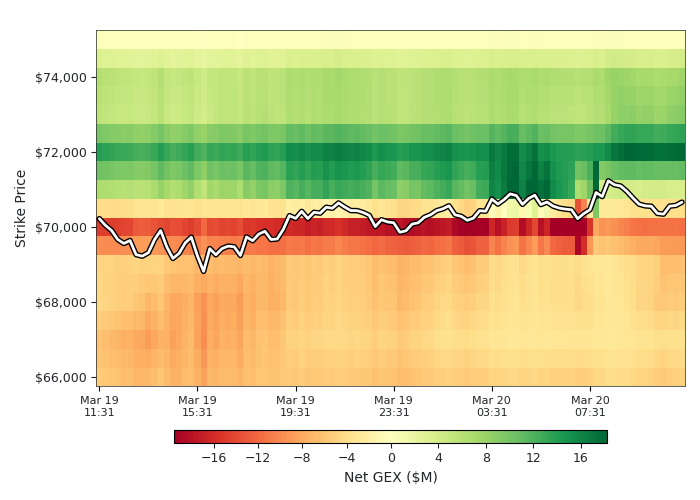
Heatmap Preview Net GEX

|GEX| (free)

Heatmap Preview Absolute GEX
  • Dashboard for Free Users: The GEX Dashboard is now accessible to all users with premium gating on individual sections — see the gamma overview at a glance.

Improved

  • Dashboard Labels: Heatmap time periods renamed to clearer 2d/3d format. "ABS GEX % Change" renamed to "GEX Change Table" for clarity.
  • Upgrade Experience: Consistent upgrade modals across all premium-gated features — no more broken links or mismatched flows.
Paddle Payments & Simplified Pricing#

Added

  • Paddle Payments: New payment provider with improved checkout experience. Existing LemonSqueezy subscribers are fully supported — manage your subscription as usual from the Account page.

Improved

  • GEX NET Line Overlay: The Term Structure chart's GEX NET view now shows a dotted line with diamond markers tracing the net total across expirations. Makes it easy to read the net value even when positive and negative exchange stacks overlap.

Removed

  • Referral Program: Discontinued due to low adoption. The Community Contributor Program remains active — create educational content and earn free Premium access.

OKX Exchange Integration#

Added

  • OKX Exchange Support: OKX is now available as a third exchange alongside Deribit and Bybit. All GEX charts — GEX by Strike, Gamma Profile, OHLC, Term Structure, Heatmap, and Dashboard — now include OKX options data.
  • Select OKX individually or combine with Deribit and Bybit for a complete cross-exchange view
  • OKX data appears in distinct blue in the Term Structure chart, stacked alongside Deribit (green) and Bybit (orange)
  • Available for all supported assets where OKX lists options
  • ~99.5% Market Coverage: Adding OKX brings total crypto options market coverage to ~99.5%.

GEX Heatmap#

Added

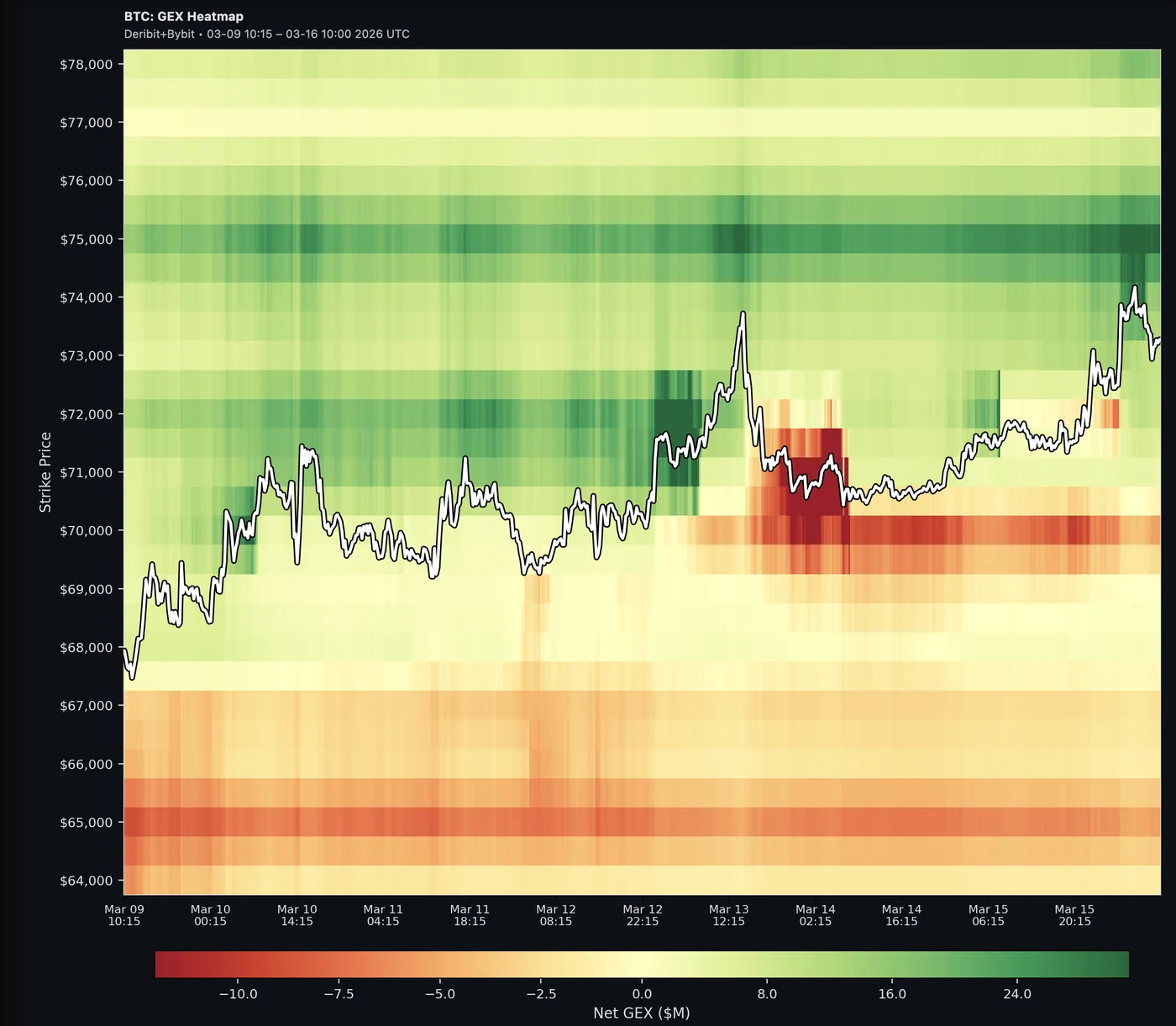
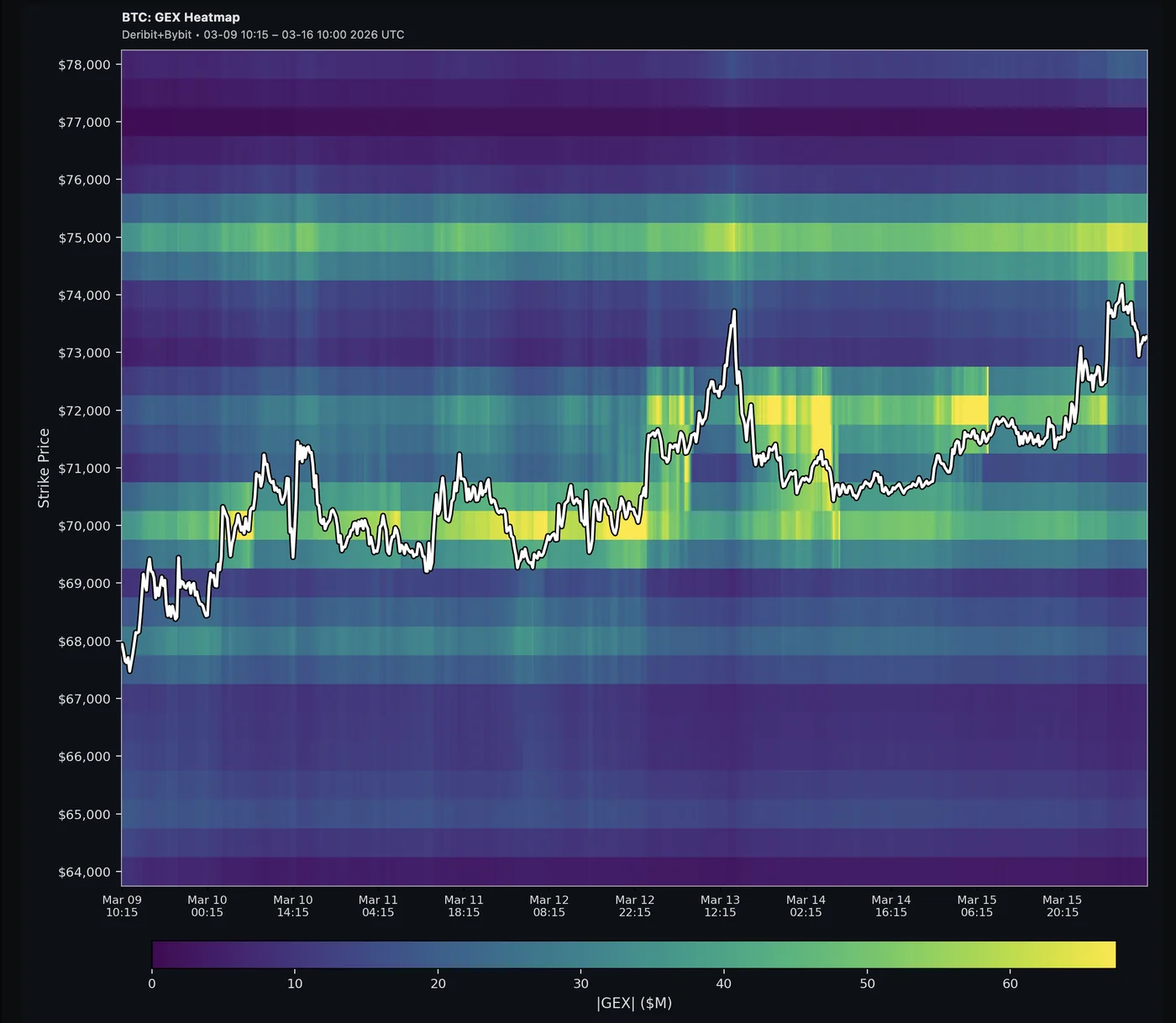
  • GEX Heatmap: Visualize gamma exposure across strikes over time in a 2D color matrix with the price path overlaid.
  • Net GEX mode: Green = stabilizing zones (dealers absorb moves), Red = amplifying zones (dealers accelerate moves)
  • |GEX| mode: Total hedging pressure concentration — find the strikes that matter most
  • Hover tooltips show exact GEX values, strike, price, and timestamp
  • Multiple color palettes (Red-Yellow-Green, Red-White-Green, Viridis, Seismic, and more)
  • Configurable grid step, upscale factor, and Y-axis buffer
  • Premium & Trial: All coins (BTC, ETH, SOL, XRP), up to 90 days of history, live data, multi-exchange (Deribit + Bybit combined)

Net GEX

Net GEX Heatmap

|GEX|

Absolute GEX Heatmap

Blog

GEX Dashboard & Navigation Overhaul#

Added

  • GEX Dashboard: New at-a-glance overview page — one screen, no clicks. See the full gamma picture for BTC, ETH, SOL, or XRP without opening the full studio.
  • Gamma Regime Gauge: Semicircular gauge showing whether the market is in positive gamma (calm, mean-reverting) or negative gamma (volatile, trending). Five zones from Strong Negative to Strong Positive with animated needle.
  • Call/Put Gauge: Normalized ratio of call vs. put GEX — quickly see whether dealers are stabilizing or amplifying moves.
  • Up/Down Gauge: Shows where hedging pressure concentrates relative to current price — above or below.
  • 24h Trend Charts: Four mini-charts tracking Call/Put ratio, Up/Down pressure, Net GEX, and Absolute GEX over the last 24 hours with hover crosshairs.
  • Strike Heatmap: See which strikes are gaining or losing gamma over time (now vs. 24h / 48h / 1 week). Filter by top 50%, 80%, 90%, or 100% of strikes by concentration. Green = gamma building, Red = gamma fading.
  • Product Switcher: New dropdown on the logo lets you jump between Dashboard and GEX Studio from any page.
  • Strike Concentration Filter (GEX Studio): Show only the strikes responsible for a given percentage of total absolute GEX (90%, 95%, 99%, or 100%). Lower values cut the noise and highlight the most impactful strikes. Experimental.

Improved

  • Unified Navigation: Consistent header bar across Dashboard, GEX Studio, and the landing page — same look and feel everywhere.
  • Quieter Telegram Alerts: Alerts are now limited to two types — Gamma Flip (regime change crossing) and Daily Brief (morning summary at 8:00 UTC). All other alert types have been paused to reduce noise. Custom alert preferences (choose which alerts you receive and how often) are coming soon for premium users.

Blog

  • "Why Gamma Exposure Numbers Differ Across Platforms": Ever compared GEX charts on two platforms and got different numbers? This post explains why values can differ by 2–5x depending on dealer positioning assumptions — and why the relative structure matters more than absolute numbers.

XRP Support & Term Structure OI/GEX Analysis#

Added

  • XRP (Ripple) Support: Added XRP as a supported asset for gamma exposure analysis. Full GEX by Strike, Gamma Profile, OHLC, and Term Structure charts now available for XRP options on Deribit.
  • Term Structure View: New chart showing Open Interest and Gamma Exposure broken down by expiration date — see how positioning is distributed across the term structure at a glance.
  • GEX Absolute & Net Modes: Toggle between Absolute GEX (total magnitude per expiration) and Net GEX (directional bias) to compare gamma sizing or directionality across the curve.
  • Put/Call Ratio: Built-in P/C Ratio metric overlaid on the term chart for quick sentiment reads per expiration.
  • GEX Skew: New metric measuring directional gamma imbalance across expirations.
  • TOTAL Aggregation Bar: A pinned summary bar showing combined OI/GEX across all expirations, always visible regardless of DTE filter.
  • DTE Filter with Summary Comparison: Filter expirations by days-to-expiry and compare Σ All vs Σ Filtered totals to see how near-term positioning differs from the full picture.

Improved

  • Quieter Alerts: Further noise reduction for Telegram channels — same-cycle alerts for nearby levels are now consolidated into a single message, cross-expiration duplicates within 2% are suppressed, and secondary markers (P2/N2) have longer cooldowns.

Documentation

Chart Downloads & Smarter Alerts#

Improved

  • High-Resolution Chart Downloads (Premium): The camera button now exports a crisp, professionally rendered PNG — no longer a screenshot of the browser canvas. Charts come out sharp at any zoom level and are ready to share.
  • Smarter Alert Filtering: Telegram key level alerts are now significantly less noisy. Slow sideways drift no longer triggers repeated alerts, approach direction is tracked so switching sides resets cleanly, and when the TOTAL expiration fires for a level, per-expiry duplicates are suppressed.

Telegram GEX Alerts (Beta)#

Added

  • Telegram Alert Channels (Beta): Real-time GEX alerts delivered via dedicated Telegram channels — one per asset:
  • @gammaflip_btc — Bitcoin
  • @gammaflip_eth — Ethereum
  • @gammaflip_sol — Solana
  • Alert Types: Gamma Flip (regime change), Key Level Approach (price nearing S/V markers), Bias Shift (bullish/bearish GEX flip), Flip Point Migration (flip level moves to new strike), and Daily Brief (morning summary of key levels).
  • Channels are free and public during beta — will transition to premium-only after beta period.

Replay Controls Mobile Fix#

Fixed

  • Replay Playback Controls: Fixed unresponsive play/pause and marker toggle buttons on mobile during replay playback.